
As many users know, getting stuck on a Google FRP lock can be disturbing. It happens after a factory reset when you forget your Google account details. Although this security measure protects your data, it can also block rightful access. Thankfully, tools like Dr.Fone Screen Lock make the process easier to handle. Hence, this guide explains safe ways to bypass the FRP lock and regain control of your Samsung.
Table of Contents
Part 1. What Is Google FRP (Factory Reset Protection)?
It is basically a native Android security feature introduced in version 5.1. FRP activates automatically once a Google account and screen lock are added to the phone. When someone resets the device without authorization, it demands the previous Google account details. This feature helps protect ownership and prevents misuse of lost or stolen devices.
Nevertheless, many users face this lock when they forget old account information after resetting. The situation becomes confusing because the device refuses access until verification is completed. In such moments, some people look for a safe FRP bypass method to regain control.
Part 2. How to Bypass Google FRP Lock on Samsung Devices
Several simple and quick ways are available to unlock your device from FRP lock. Thus, the following methods help you regain access when you forget the required Google account:
1. Exploit Device Glitches (TalkBack, YouTube, etc.)
Some users try simple glitches that help move around the FRP screen. These tricks use TalkBack or YouTube shortcuts to open hidden phone settings. They create small paths that let you complete an FRP bypass through an APK file. Go through the steps below to utilize this method:
Step 1. During phone setup, connect to Wi‑Fi and return to the welcome screen. Hold two fingers on the display to enable “TalkBack,” then follow the prompt to open “Google Assistant > YouTube.” Continue through “Agree > No Thanks > Web Link,” and type “maxroms.com” in the URL bar.
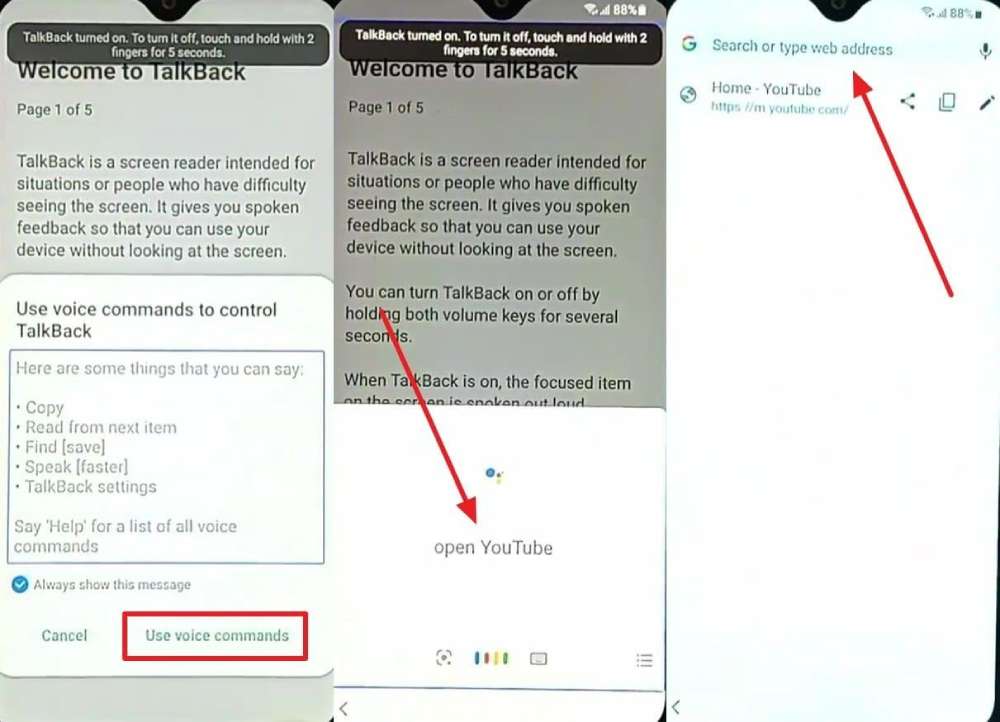
Step 2. Choose “Maxroms Google Bypass > Settings > Samsung Account” and sign in. Then go to “Accounts and Backup > Bring Data From Old Device > View App Details for Smart Switch.” Use the search icon to find “File Manager,” and install it along with “App Launcher.”
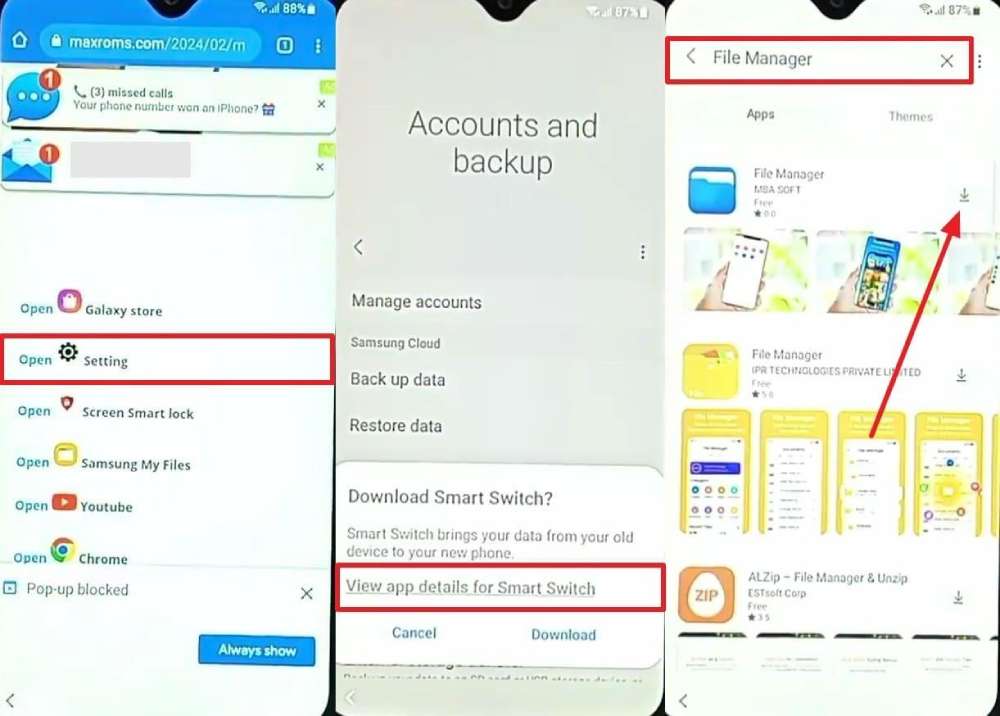
Step 3. Open “Chrome” again, return to “MaxRoms,” and download “FRP_Android_7.apk” and “FRP_Bypass.apk.” Navigate to “Settings > Privacy > Permission Manager > Files and Media > Show System.” Set “Android Setup” and “My Files” to “Don’t Allow,” then enable “Install Unknown Apps” for “File Manager” from “Biometrics And Security.”
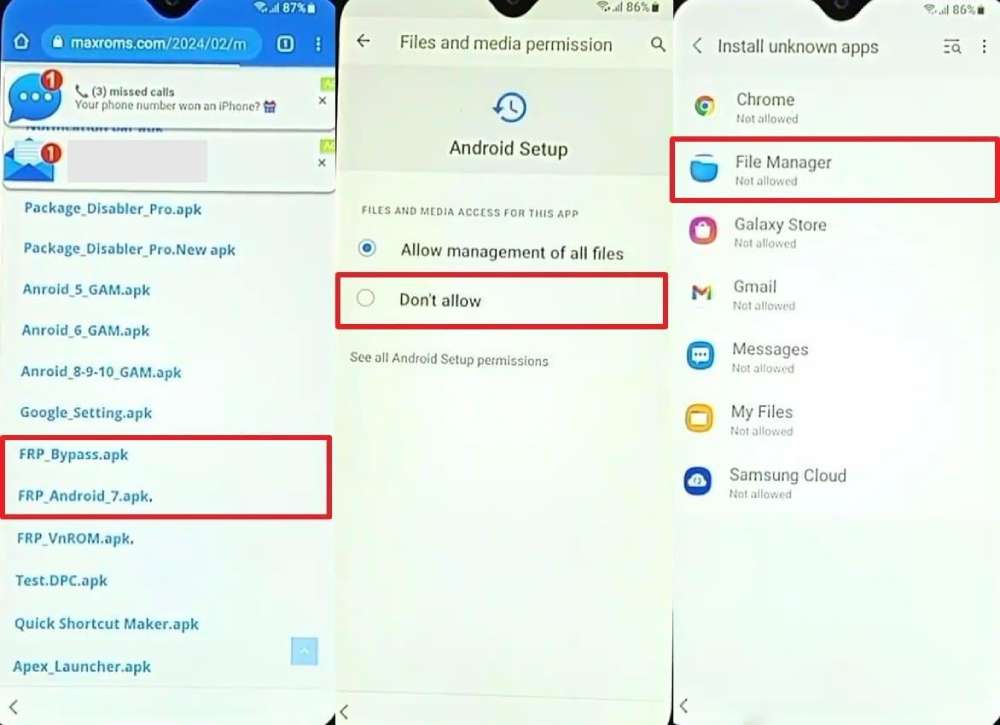
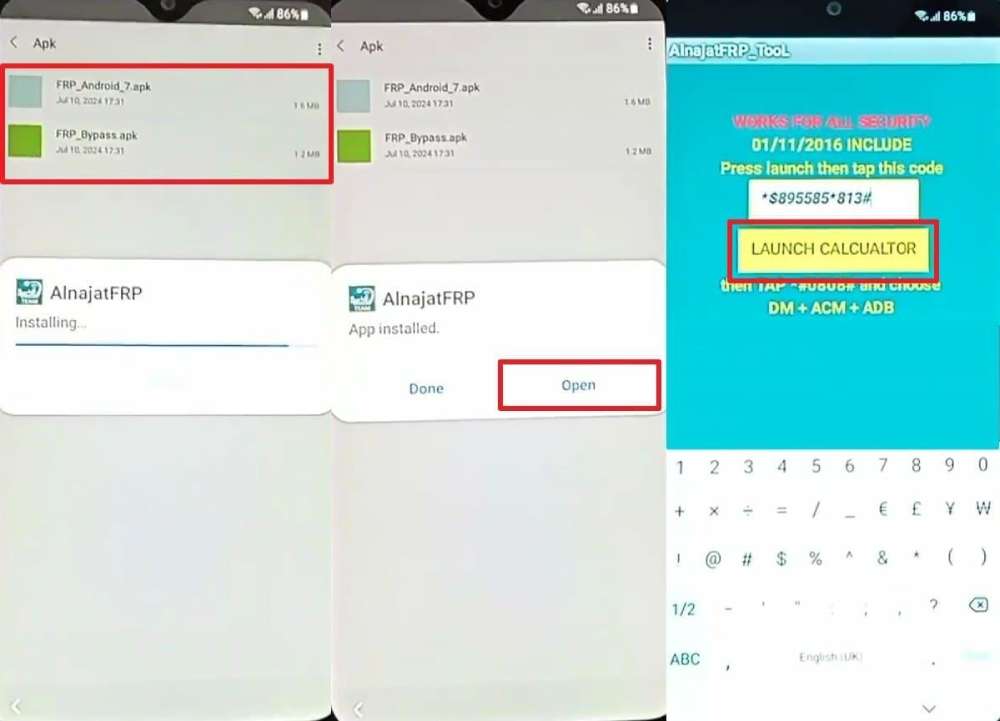
Step 4. Launch “File Manager” to install both APK files. After installing “FRP_Android_7.apk,” tap “Open > Continue” and enter the code “*$895585*813#.” Press “Launch Calculator” 10 to 20 times until the device restarts. Once it reboots, the Google FRP lock will be successfully bypassed.
2. Ask the Seller to Remove Their Account
In case the device is secondhand, you can ask the previous owner to remove their account. This method removes the linked Google account without needing any tools. Once the seller deletes their account remotely, the phone unlocks and becomes ready for new user registration. Thus, it is safe and prevents data loss while completing a proper device setup.
3. Contact Your Device Manufacturer’s Support
Reaching out to the device manufacturer’s support team can also be an effective solution. They can verify ownership details and help unlock the device through official steps. It ensures your phone stays secure while regaining full access easily and legally. However, this solution works best when account verification or proof of purchase is available.
Part 4. Try a PC-Based Solution When Trick Doesn’t Work for You – Dr.Fone Solutions!
When simple tricks fail, a reliable computer tool can handle the FRP lock. In this part, you will explore a dedicated Android phone unlocker to remove FRP locks smoothly:
1. Dr.Fone Online Unlock (For Samsung Devices Only)
The Dr.Fone Online Unlock service offers a fast and secure way to bypass FRP. It works as a trusted Samsung FRP removal tool designed specifically for all Samsung models. Users only need to provide the device’s IMEI or serial number for quick verification. Plus, Dr.Fone ensures complete Google account removal, allowing login with any new account.
Also, it supports Galaxy S, Z, C, and W series across global regions and systems. This dedicated tool also works perfectly with One UI 5.0, 6.0, 6.1, and 7 versions smoothly. The service guarantees a 100% FRP removal success rate on Samsung phones and tablets. Moreover, most devices usually unlock within 1 to 10 minutes without technical steps.
Stepwise Guide to Bypass Samsung FRP via Dr.Fone Online Unlock
You can follow the given guide to remove this specific FRP lock online using this web version:
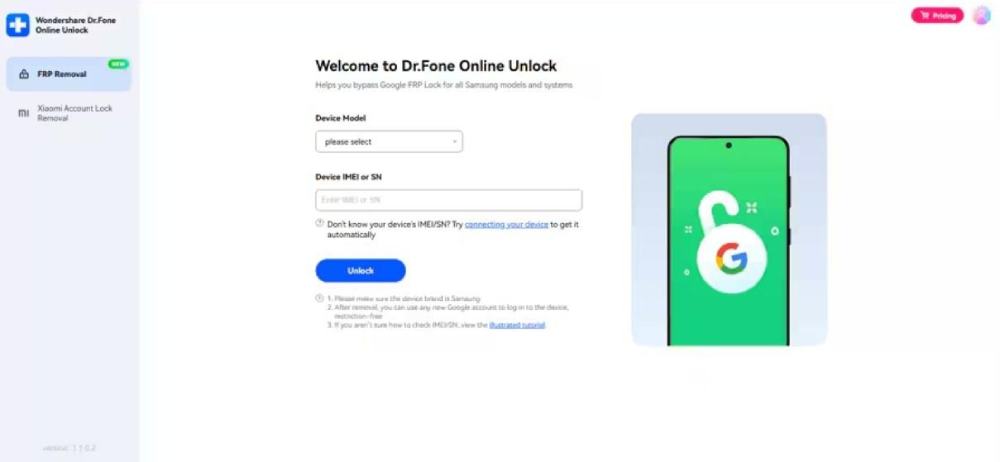
Step 1. Open the Web-Based FRP Unlock Tool
To initiate, navigate to the “FRP Removal” tab and pick the exact “Samsung” model you want to unlock. You can either type in the device’s IMEI number yourself or use the automatic detection feature if the phone is connected.
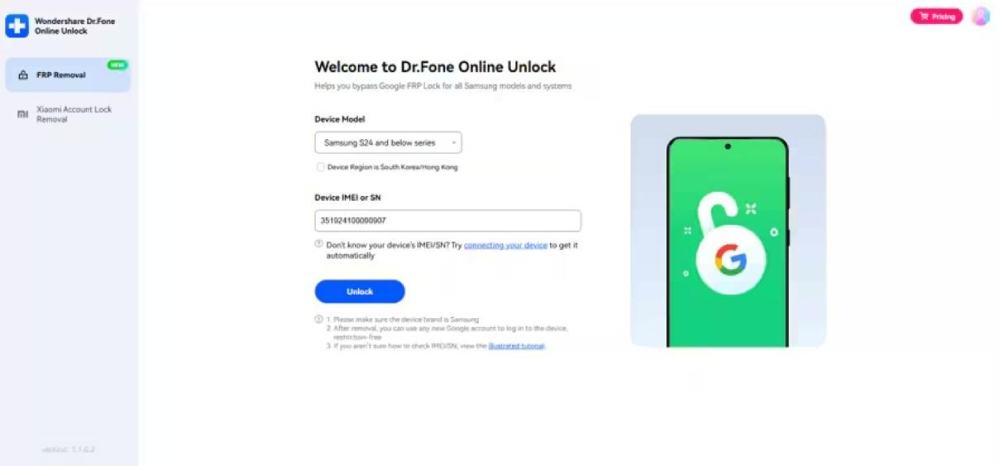
Step 2. Start the Samsung FRP Unlock Process
Once the system verifies your device information, press the “Unlock” button. The remote server will process the FRP unlock request and guide you through the steps needed to activate your device.
Use Case of Using Dr.Fone Online Unlock
- Forgotten Account: Helps when you forget your old Google login after a reset.
- Secondhand Device: Useful when purchased phones still show previous owner verification screens.
- Fast Unlock: Ideal when immediate FRP removal is required for urgent access.
- Screen Damage: Allows unlocking when the screen is unresponsive or broken.
- Multiple Owners: Clears previous account data when ownership of the device changes hands.
2. Dr.Fone – Screen Unlock (Compatible with Major Android Brands)
Dr.Fone – Screen Unlock is another tool that supports more than 15 major Android brands. It works smoothly on Android 16 and all earlier software versions without issues. Users can unlock smartphones and tablets with simple instructions provided during the process. Moreover, it provides a near 100% success rate for both Snapdragon and MTK chipsets.
Furthermore, Dr.Fone offers a dedicated One-Click Removal to bypass FRP within only minutes. The tool displays real-time progress updates, keeping users informed about every unlock stage. It also prevents data leaks and protects the device from damage. Besides, the tool handles complex FRP barriers without requiring technical knowledge whatsoever.
Detailed Steps to Bypass Samsung FRP Using Dr.Fone – Screen Unlock
Let’s explore how you can remove this FRP lock through this program:
Step 1. Launch the FRP Removal Option
Open the program’s “Toolbox” section and choose “Screen Unlock” for “Android.” Opt for the “Remove Google FRP Lock” and connect your Samsung device to the computer using a USB cable.
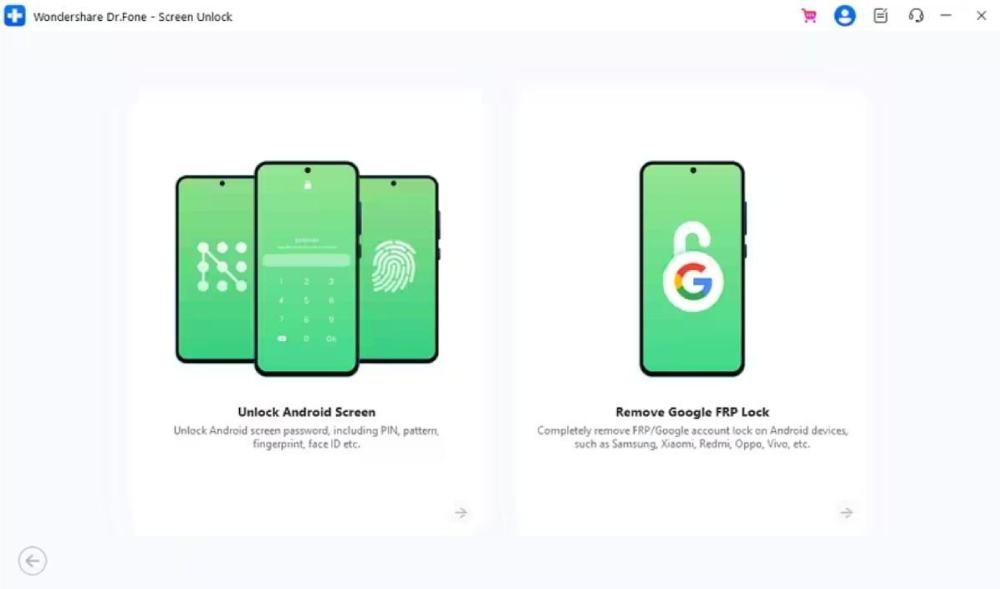
Step 2. Pick the Correct Android Unlock Method
Choose “Samsung” as your device brand when the software asks for details and hit “Start.” Later, select “All Android Versions (One‑Click Removal)” and click the “Start” button.
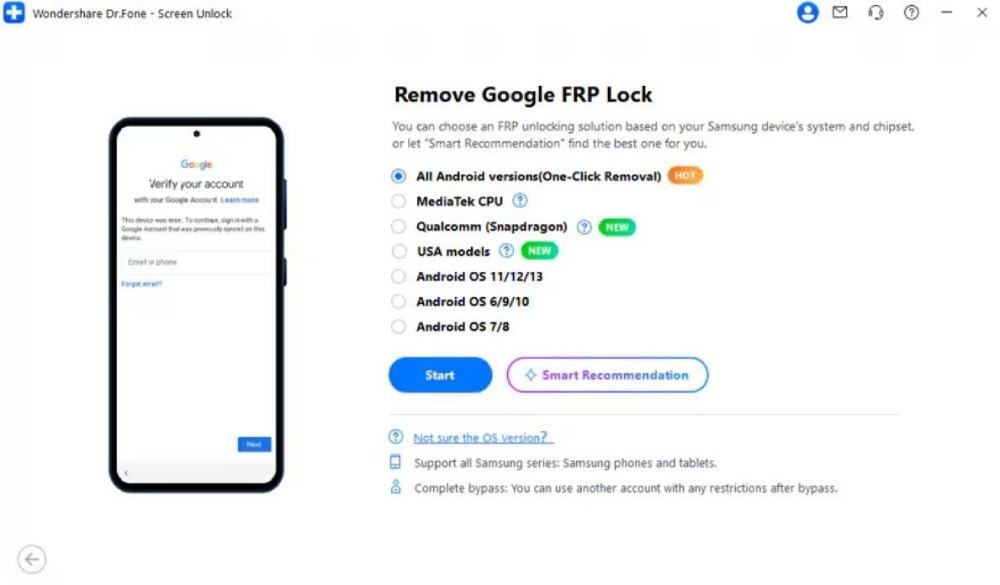
Step 3. Bypass Your FRP Lock on Your Device
Adhere to the displayed instructions to enable “USB Debugging” on your phone. Afterward, press “Authorized” and let the program bypass FRP while showing your real-time progress screen.
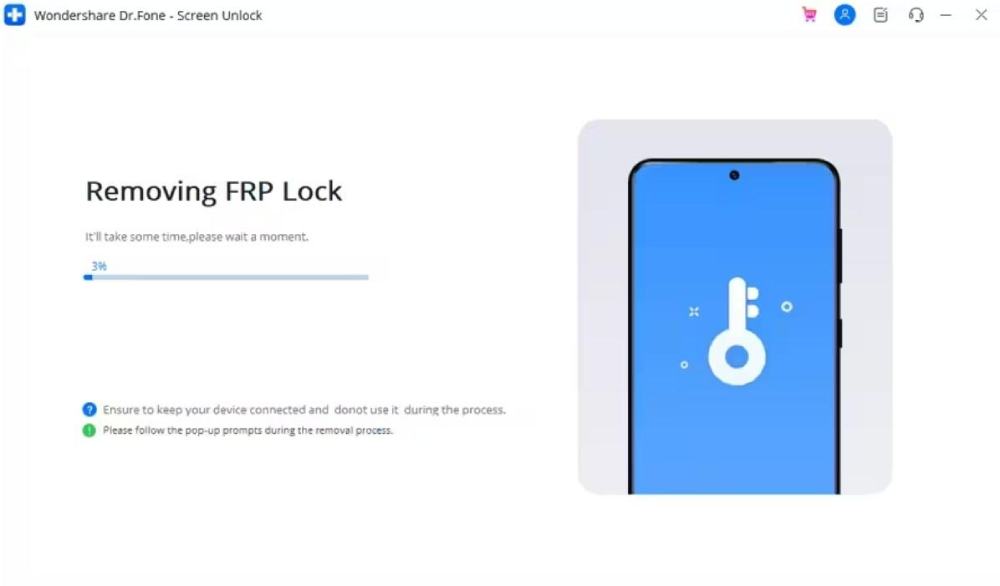
Use Cases of Using Dr.Fone – Screen Unlock
- Latest Versions: Useful when your phone runs Android 16 or other recent updates.
- Chipset Compatibility: Works well for devices using Snapdragon or MTK hardware.
- Locked Tablets: Helps unlock Android tablets showing FRP screens after a reset.
- Unresponsive Devices: Useful when glitch methods fail, and manual options cannot unlock.
- Fingerprint Failure: Bypasses the lock when the fingerprint or face recognition stops responding.
Part 5. How to Prevent Getting Locked by FRP Again?
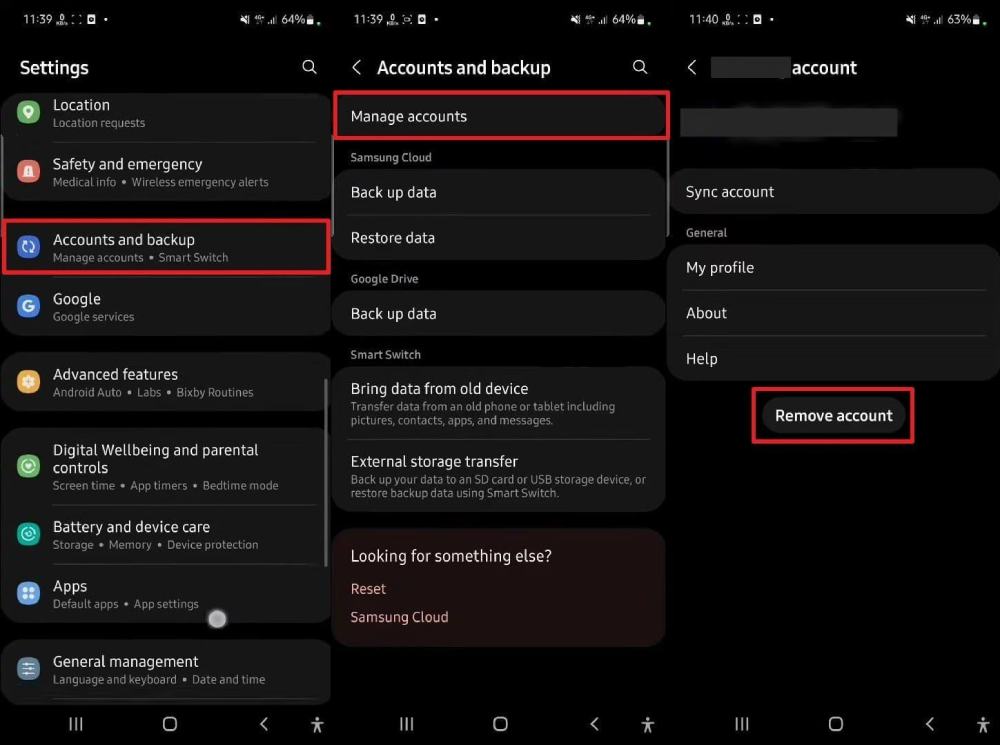
Avoiding future FRP lock issues is easy with a few careful steps. You should also remember to remove your Google account from the device before a reset. Also, check that your login details work properly to prevent any access trouble later. So, take guidance from the steps below to sign out of your Google account:
Instructions. Upon accessing settings, head to “Accounts and Backup” and tap “Manage Accounts.” After that, choose your signed-in Google account and press the “Remove Account” button.
Conclusion
In conclusion, bypassing Google FRP lock becomes easier when you follow the right methods. Always choose safe and verified solutions to avoid permanent damage. Whether you use manual tricks or PC tools, ensure everything runs smoothly. For faster results and effortless unlocking, using Dr.Fone Screen Lock is highly recommended for all Samsung users.
Also Read: 5 Ways Skrill Software Streamlines Global Money Transfers